On October 29, 2026, Cursor found a bad Claude Code extension in Cursor’s VS Code Extension Marketplace. Someone had tampered with versions 2.1.312 and 2.1.313 of Anthropic.claude-code for Windows and macOS. Cursor’s notice states that Anthropic did not write the bad versions. The bad versions were live from about 2:27am to 1:35pm PT that day.
The payload in the bad versions tried to plant an SSH backdoor that stays put. It wrote an attacker key into authorized_keys, opened a reverse SSH tunnel, and added startup persistence. A host that installed or auto-updated the extension in Cursor during that window needs a check today.
Every check command, cleanup step and indicator in this post is copied as is from Cursor’s notice and Microsoft’s analysis.
Who is affected by the malicious Claude Code extension in Cursor
Cursor’s scope covers installs or updates of Anthropic.claude-code 2.1.312 or 2.1.313 from the Cursor VS Code Extension Marketplace, on macOS or Windows, between 2:27am PT and 1:35pm PT on October 29, 2026.
The sources also rule some things out:
- Cursor audited access and found no other tampered extensions, and other extensions in Cursor’s marketplace were not hit.
- Microsoft found that the bad packages were never put on the Visual Studio Marketplace or npm, and Anthropic confirmed its systems were not compromised.
- Cursor has no evidence that other versions of the extension or the official build of the extension are hit.
So the official extension in VS Code does not appear to be in scope. The exposure is Cursor’s marketplace during that window. Cursor wrote the notice for macOS and Windows, but the IOC list in the notice also has Linux paths, so a hunt should cover Linux hosts too.
What the payload did
Both sources describe the same chain. The injected code ran when the extension module loaded, ahead of the normal extension code.
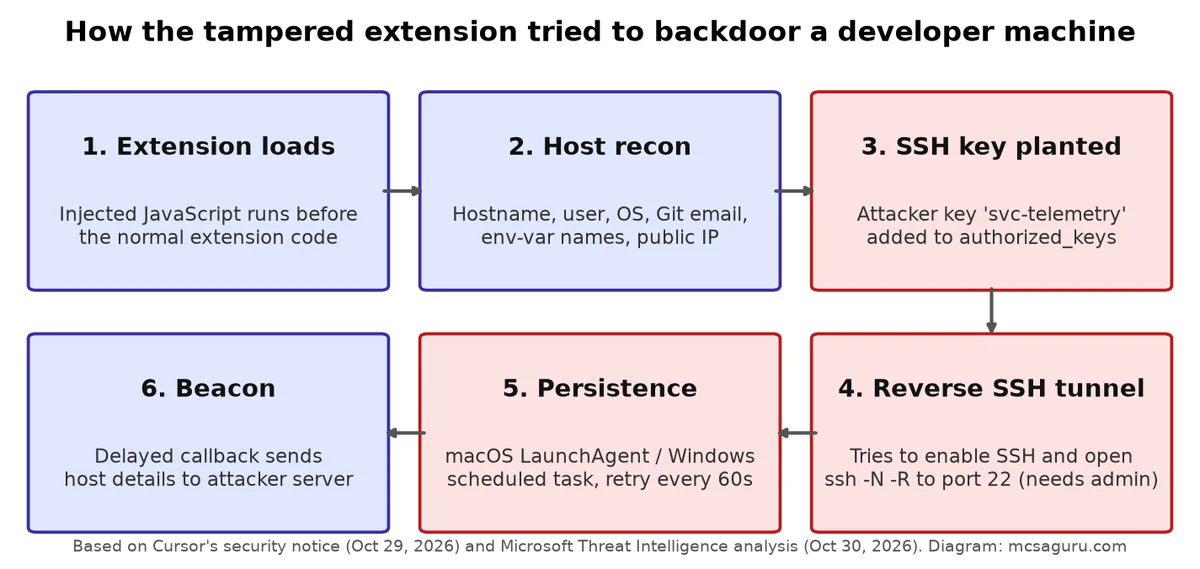
- Collected host details. Cursor lists hostname, username, OS, architecture, home directory path, environment variable names, working directories, configured Git email and public IP. Microsoft notes the payload sent the names of the environment variables, not their values.
- Added an attacker SSH key labelled
svc-telemetrytoauthorized_keys. - Tried to enable the local SSH service and open a reverse SSH tunnel to the attacker server.
- Set up persistence with a LaunchAgent on macOS, or on Windows with a scheduled task that tries to run as SYSTEM, with a Startup-folder fallback. Per Cursor, background scripts retry the tunnel roughly every 60 seconds.
Turning on the SSH service needs admin rights, and per Cursor the extension does not have admin rights on most macOS and Windows hosts. Errors in the bad code also broke that step unless Cursor was started with administrator privileges. On those hosts the attacker could not log in through the tunnel. That is the good news, but only some of it. The key, the persistence and the host-data report could still be written, which is why Cursor says to follow the remediation steps regardless.
Per Cursor, the attacker server no longer works. Cursor took down the extension, shut down the marketplace, rotated its keys and rebuilt the marketplace, then worked with the hosting provider to take the attacker server offline.
Step 1: check whether you are impacted
Cursor’s check looks for the svc-telemetry key comment. On macOS:
grep -qs svc-telemetry ~/.ssh/authorized_keys && echo "svc-telemetry key found" || echo "No key found; machine not impacted"On Windows, in PowerShell:
$files = "$HOME\.ssh\authorized_keys", "C:\ProgramData\ssh\administrators_authorized_keys" | Where-Object { Test-Path $_ }
if ($files -and (Select-String svc-telemetry $files)) { "svc-telemetry key found" } else { "No key found; machine not impacted" }
If the key is found, the host is impacted. Microsoft adds a caution: a missing marker on its own should not take the place of a review of install, process, network and persistence evidence. So a host that installed the bad version is still suspect when the grep comes back clean.
Step 2: preserve, isolate and clean up
Cursor’s five steps for affected installs, in order:
- Run the check script to validate whether you are impacted.
- Search endpoint, network and extension-installation telemetry for the indicators below.
- Isolate hosts showing evidence of payload execution or backdoor installation.
- Remove the unauthorized SSH key, persistence mechanisms and running tunnel processes, and assess whether the host should be rebuilt.
- Rotate credentials and sessions accessible from affected hosts, from a trusted system.
Microsoft adds the step that tends to get skipped: preserve evidence first. Keep the extension package, the modified SSH authorization files, the generated keys and scripts, and the startup config, all before cleanup.
Cursor put out remediation scripts that remove the bad extension, the persistence, the tunnel processes and the attacker’s key. The scripts exit non-zero if anything is left. Get the scripts from Cursor: remediate-macos.sh and remediate-windows.ps1, both linked from the security notice. On macOS, the script runs as the affected user, not as root, from the folder it was saved to:
bash remediate-macos.shOn Windows, the script runs from PowerShell opened with Run as Administrator, in the folder it was saved to:
powershell -ExecutionPolicy Bypass -File .\remediate-windows.ps1Microsoft says to read the scripts before you run them, which is good practice for any script that edits SSH keys and startup items. Then check the exit code. A non-zero exit means something is left.
Microsoft’s guidance per platform, for cleaning up by hand:
- macOS: unload and remove the LaunchAgent at
~/Library/LaunchAgents/com.apple.sysmond.plist, and remove~/.config/.smtand~/.config/.smtk. - Linux: remove the user-crontab
@rebootentry referencing~/.config/.smt, keep unrelated entries, and remove the script and~/.config/.smtk. - Windows: remove the
SysMonscheduled task, the Startup-foldersysmon.cmdfallback, and%USERPROFILE%\.config\smt.cmdand%USERPROFILE%\.config\smtk. - All platforms: stop the malicious SSH and retry processes, and remove the temporary
.stk_identity files after collection.
The usual mistake here is to delete the whole authorized_keys file. That also deletes the real keys. Remove only the entry that matches the fingerprint below, and keep the real keys and the remote-development setup as they are. Names like SysMon are chosen to look like real monitoring tools, so check what a startup object runs before deleting it.
Indicators of compromise
Cursor’s notice is the source for these, and Cursor updated the notice on October 30, 2026 at 11:30am PT. The addresses stay defanged as published.
Package hashes (VSIX):
2.1.312 darwin-arm64: fcbb327e38e61c4fec795e0d0591f52cd1014b813d20a5912104953c3a17c364 (MD5 e0d64d53e802a0217ba6f0e656ed2f20)
2.1.312 win32-x64:    3de1722901165769893bef57c72594e9a54459faa23f3091b136b79966edd081 (MD5 bd3b71ddf3d0cc3af76249afd2c0eda1)
2.1.313 darwin-arm64: 80402fdcad8799285fd93044976973ca000da7995fb93363f819bb8e4f84ee6c (MD5 34e491161e056c9b899a79b602ac73b9)
2.1.313 win32-x64:    6786ec90cbd45949695bd7805c9fbb26cfc91bc5fc897de0183d9bcb9cb21731 (MD5 7838a3be2ca0ff08c1bdb160ef516d39)
Payload (extension.js):
SHA-256: ecb58cb29078d9646ad1dcdbe51526f2d9cfea06be5fb2ab183e8ecc3ab6bf15
MD5: f49bcd657ef1e626e85ce858958c1769
Network:
Attacker endpoint: 134[.]209[.]82[.]225
Reverse SSH: tunnel@134[.]209[.]82[.]225, TCP 22
External beacon: hxxp://134[.]209[.]82[.]225:8099/beacon (HTTP POST)
Local beacon attempt: 127[.]0[.]0[.]1:8099/beacon (HTTP POST, loopback)
The payload looks up ifconfig[.]me and api[.]ipify[.]org. Cursor’s notice marks both as legitimate services, so access alone is not an indicator.
SSH:
Unauthorized public key: ssh-ed25519 AAAAC3NzaC1lZDI1NTE5AAAAIDdvylCEJ/k2TpezcTfedrkHyFSK9IZ3vmP6vhY4Ss0P svc-telemetry
Unauthorized key fingerprint: SHA256:0Z6R+DF64Do2nwQic8a7kkfDLNNk4IiK+2U2Rci4htk
Reverse-tunnel key fingerprint: SHA256:KOAU57+ZG6u3MG4WwzPzPX2O5YEe9qdOC1Bl+6MVyDQ
Key comment: svc-telemetry
Files and persistence:
Linux / macOS: unauthorized key in ~/.ssh/authorized_keys; ~/.config/.smt, ~/.config/.smtk
Linux: /tmp/.stk_<10 hex>; cron @reboot /bin/sh " /.config/.smt"
macOS: $TMPDIR/.stk_<10 hex>; ~/Library/LaunchAgents/com.apple.sysmond.plist (label com.apple.sysmond)
Windows: %USERPROFILE%\.ssh\authorized_keys, %USERPROFILE%\.config\smt.cmd, %USERPROFILE%\.config\smtk, %TEMP%\.stk_<10 hex>; scheduled task SysMon (attempts to run as SYSTEM); fallback %APPDATA%\Microsoft\Windows\Start Menu\Programs\Startup\sysmon.cmd
Process and command line:
ssh -N -R '*:0:localhost:22', autossh -M 0
SSH options: StrictHostKeyChecking=no, UserKnownHostsFile=/dev/null, ServerAliveInterval=30, ServerAliveCountMax=3, ExitOnForwardFailure=yes, IdentitiesOnly=yes
schtasks /create /tn SysMon
systemsetup -setremotelogin on
Add-WindowsCapability -Online -Name OpenSSH.Server~~~~0.0.1.0
Microsoft also lists the SHA-256 of the decoded tunnel private-key file:
7e0a52885fadee05544a9e99eb18c792bec05900a5e1a66d68f8383decb0e278Microsoft’s post has advanced hunting queries for Microsoft Defender XDR that cover the IP, the file artifacts, the scheduled task and the LaunchAgent. Microsoft treats a query hit as an investigative lead, not proof of compromise.
Response checklist
Malicious Claude Code extension response
- List every machine that runs Cursor and had the Claude Code extension on October 29, 2026
- Run Cursor's svc-telemetry check on each macOS and Windows machine
- Search endpoint and network telemetry for the IOCs above
- Preserve the extension package, authorized_keys, scripts and startup config before cleanup
- Isolate hosts with evidence of payload execution or backdoor installation
- Run Cursor's remediation script and confirm it exits with status 0
- Remove only the svc-telemetry key entry and keep legitimate keys
- Rotate credentials and sessions from a trusted machine
- Decide whether each affected host should be rebuilt
- Restart and confirm the tunnel and startup artifacts do not return
Hardening for next time
Microsoft points Cursor users to Cursor’s security-hardening guidance, which covers two controls. The first limits extensions to approved publishers. The second is an extension install cooldown: a newly published version waits before it installs. The bad release was live for about 11 hours, so a cooldown would have kept most machines away from it.
The extension ran with the user’s rights and could arrive through auto-update, and Cursor’s marketplace was the weak link even though the vendor’s own channels were clean. Our Claude Code security best practices cover the same trust problem for MCP servers, and the guide to adding a Claude Code marketplace is worth a reread with this incident in mind. For a fleet, see Claude Code setup for sysadmins.
Bottom line
The one-line check looks for the svc-telemetry key that the payload adds to authorized_keys, and each host that runs Cursor with the Claude Code extension needs the check today. A hit on a host means isolate the host, preserve evidence, clean up with Cursor’s script, rotate credentials and consider a rebuild. A clean grep does not clear a host that installed the bad version, because the marker can be missing, so that host still needs a look at the persistence paths above. An install cooldown then gives the next bad release less time to spread.