
OpenAI released GPT-6.1 Terra on October 26, 2026. The API serves it as gpt-6.1-terra, and ChatGPT offers it in Work and Codex, but not in the Chat tab. OpenAI prices it at $1 per million input tokens and $5 per million output tokens, and OpenAI’s release notes put that at 50% lower than both GPT-5.6 Terra and GPT-6.1 Sol.
Three days later, Codex CLI 0.166.0 added Terra to its bundled, Vertex AI and Amazon Bedrock model catalogs. Teams that run Codex or call OpenAI’s API for routine work can test it this week.
GPT-6.1 Terra pricing
| Item | Standard API price |
|---|---|
| Input tokens | $1 per million |
| Cached input tokens | $0.05 per million |
| Output tokens | $5 per million |
OpenAI’s release notes add two details. API usage is billed separately from ChatGPT subscriptions, so a ChatGPT plan doesn’t pay for API calls. And Terra doesn’t support UAE inference residency. OpenAI ties that restriction to where inference runs, not to where you are.
OpenAI says the same usage allowance in ChatGPT Work and Codex covers more tasks with Terra than with GPT-5.6 Terra, and substantially more than with GPT-6.1 Sol or GPT-6 Astra. Plus, Pro, Enterprise and Edu users get Terra there.
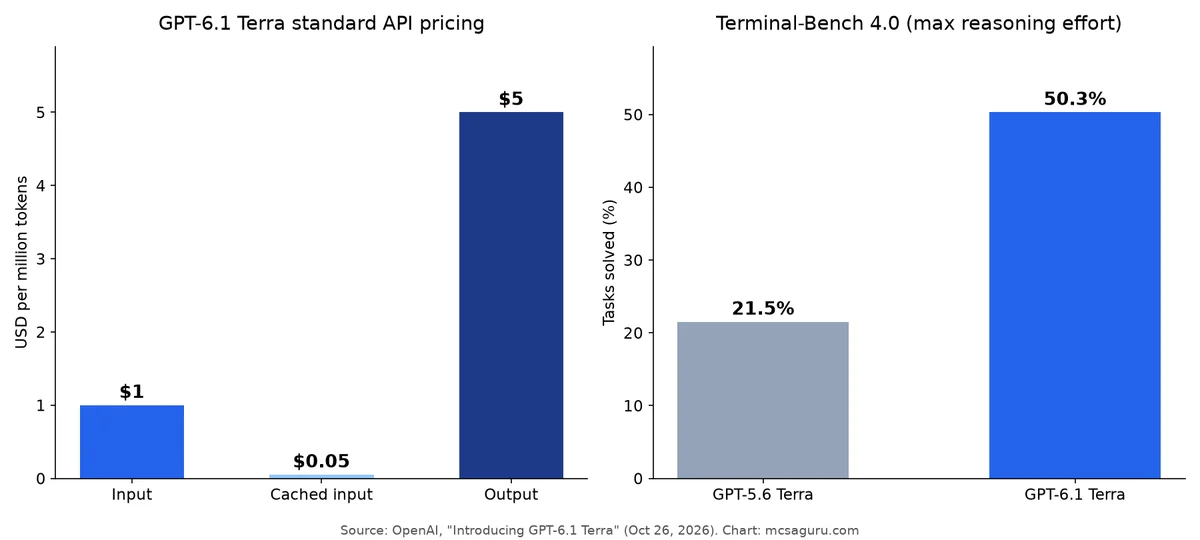
Cached input costs $0.05 per million, a twentieth of the fresh input price. A workload that resends a long system prompt or a large shared context pays the cached rate for the repeated part, so the real savings can be there, and the stable part of the prompt belongs first.
What the benchmarks claim
Every number below is OpenAI’s own. We haven’t seen independent results yet.
Coding. On Terminal-Bench 4.0, which tests coding agents solving problems from the command line, Terra solves 50.3% of tasks at maximum reasoning effort. OpenAI compares that with GPT-5.6 Terra’s published score of 21.5%, more than double.
Factual errors. On OpenAI’s internal benchmark of error-inducing prompts, the error rate at low reasoning effort fell from 53.6% with GPT-5.6 Terra to 16.7% with GPT-6.1 Terra. At maximum effort, OpenAI says the error rate fell by 18 percentage points to 4.3%.
Computer use. On Agents’ Last Exam at medium reasoning effort, OpenAI says Terra scores 15 percentage points higher than GPT-5.6 Terra at about one-third the cost. On OSWorld 2.1 at medium effort, it says Terra beats GPT-5.6 Terra’s best score at a fraction of the cost per task.
GPT-6.1 Terra vs GPT-6.1 Sol: where Terra fits, and where it doesn’t
OpenAI states the limit itself: for the most complex coding tasks, GPT-6.1 Sol and GPT-6 Astra remain the better choice. So OpenAI does not position Terra as its top coding model.
Here’s roughly how we’d split work:
| Work type | Reasonable default |
|---|---|
| High-volume automation, such as reading invoices and entering data | Terra |
| Routine coding: small fixes, scripts, test updates, lint cleanups | Try Terra first |
| Desktop and form-filling computer-use tasks | Try Terra first |
| Large refactors, tricky debugging, architecture work | GPT-6.1 Sol or GPT-6 Astra |
| Anything needing UAE inference residency | Not Terra |
The invoice example comes from OpenAI’s own announcement, which pitches Terra for “high-volume work.” On a big batch of simple tasks, a cheaper, faster model cuts the bill. On a hard task, the cheap model fails, the job re-runs on a stronger model, and the task is paid for twice.
A switch of every pipeline at once hides a quality drop until weeks later. A switch of one workload, then a comparison, then the next workload, shows the drop in the first comparison.
Using GPT-6.1 Terra in Codex CLI 0.166.0
Codex CLI 0.166.0, released October 29, 2026, added GPT-6.1 Terra to the bundled, Vertex AI and Amazon Bedrock model catalogs. An older version doesn’t show the model in those catalogs, so the update comes first. The Codex CLI reference documents a built-in update command that checks for and applies a Codex CLI update when the installed release supports self-update:
codex updateFor a fresh setup, see how to install Codex CLI in WSL. An install without self-update needs a reinstall with the original method (the Codex README lists npm install -g @openai/codex and brew install --cask codex). After that, pick Terra from the model list or set it in your config.
Codex through Vertex AI or Amazon Bedrock also needs Terra enabled in the cloud account and region. Codex’s catalog lists the model, but the catalog entry doesn’t give your account access.
The same release has a few other changes:
codex doctor --network-onlyfor focused configuration, connectivity and WebSocket diagnosticscodex queue --resumeto resume unloaded threads after queueing a message- Clearer safety-block explanations in the TUI
- A fix to preserve reasoning-token accounting across resume and fork, to avoid premature compaction
- Preserved approval and permission settings when resuming or forking threads
codex doctor --network-only checks configuration, connectivity and WebSocket paths, which makes it the first command to run when a new model “doesn’t work” through a proxy or gateway.
Calling it from the API
The model ID is gpt-6.1-terra. OpenAI’s model page lists both the Responses (v1/responses) and Chat Completions endpoints as supported, and says tool calling requires the Responses API. This minimal request follows the text-input example in OpenAI’s Responses API reference, with Terra’s model ID swapped in:
curl https://api.openai.com/v1/responses \
  -H "Content-Type: application/json" \
  -H "Authorization: Bearer $OPENAI_API_KEY" \
  -d '{
    "model": "gpt-6.1-terra",
    "input": "Summarise this changelog in three bullets."
  }'
OpenAI’s model page lists none, low, medium (the default), high, xhigh and max for reasoning.effort. The same page lists the other parameters Terra supports, so check it before tuning anything.
Troubleshooting the first run
These problems show up whenever a new model lands:
- “Model not found” in the API. OpenAI’s notes say Terra is “rolling out,” so access can lag on some accounts. Check the model directory and your organisation’s model access settings before blaming your code.
- Terra missing from the Codex model list. You’re almost always on a version older than 0.166.0, or a gateway in front of Codex has its own model allowlist that hasn’t been updated.
- Bills higher than expected. Output tokens cost five times input tokens, and higher reasoning effort tends to produce more output. Log token counts per task during your test so you’re comparing real costs.
- Users can’t find it in ChatGPT. Terra is in Work and Codex, not the Chat tab.
Before you switch: a checklist
Moving a workload to GPT-6.1 Terra
- Pick one workload with clear pass/fail checks to test first
- Run the same inputs through your current model and Terra and compare results
- Compare cost per completed task, not just price per token
- Try more than one reasoning effort level, since OpenAI's results vary by effort
- Upgrade Codex CLI to 0.166.0 or later if you use it
- Confirm Terra is enabled in Vertex AI or Bedrock if you go through them
- Check data residency needs; Terra does not support UAE inference residency
- Keep Sol or Astra as the fallback for complex coding tasks
Safety notes from the announcement
OpenAI says Terra meets the Critical threshold in cybersecurity under its Preparedness Framework and keeps the protections developed for GPT-6 Astra. OpenAI also reports strong resistance to prompt injection in its tests. An agent that reads untrusted web pages or documents still needs its own guardrails, because a vendor’s test result isn’t a sandbox.
To see how $1/$5 compares with other options, check our roundup of the cheapest AI coding APIs, and for choosing a tool, our Claude Code vs Codex comparison.
Bottom line
GPT-6.1 Terra costs $1/$5 per million tokens, half the standard price of GPT-6.1 Sol, and OpenAI aims it at high-volume and routine work as the cheaper, faster pick. OpenAI’s own benchmarks show big jumps over GPT-5.6 Terra, and OpenAI also says Sol and Astra remain better for the hardest coding. Codex CLI 0.166.0 is the version that lists Terra, so the upgrade comes first. Then test Terra on one workload, measure the cost per completed task, and move the rest of the work over gradually.